


The NTP client implements NTPv4 which is fully backwards compatible with NTPv3 and SNTP.
More details regarding the parameters, setup and diagnosis are included in the ⮫ application note.
For NTP client configuration add a new object “NTP client” under “Protocols (Client Protocols)”.
Only one instance of the NTP client is supported at the same time.
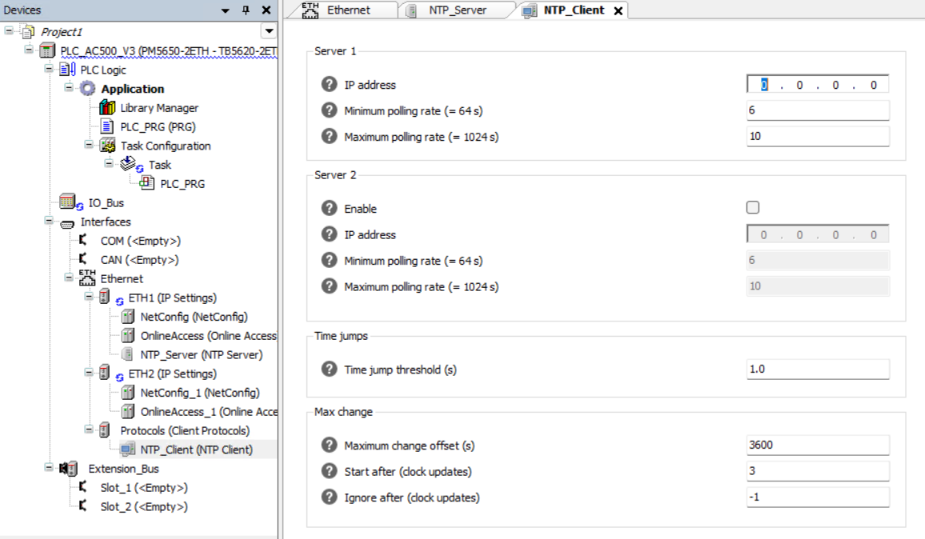
Not all parameters are shown in the user interface by default.
It should not be necessary to change the default values of the hidden parameters for most applications.
It is possible to edit the default values in the generic device editor. To display the parameters, go to “Tools Options Device editor” and enable the option “Show generic device configuration view”.
The following parameters are available:
Server 1
|
Parameter |
Default |
Value |
Description |
|---|---|---|---|
|
IP address |
0.0.0.0 |
Valid IP address |
IP address of a server which is used as external time source. |
|
Minimum polling rate |
6 2^6 = 64 s |
-4 ... 24 |
Specifies the lower limit of the polling rate. It is calculated as power of 2 and has the unit [s]. The actual polling rate is determined by the protocol itself but it will not be lower than this limit. |
|
Maximum polling rate |
10 2^10 = 1024 s |
0 ... 24 |
Specifies the upper limit of the polling rate. It is calculated as power of 2 and has the unit [s]. The actual polling rate is determined by the protocol itself but it will not be higher than this limit. |
Server 2
|
Parameter |
Default |
Value |
Description |
|---|---|---|---|
|
Enable |
FALSE |
TRUE or FALSE |
Enable server |
|
IP address |
0.0.0.0 |
Valid IP address |
IP address of a server which is used as external time source. |
|
Minimum polling rate |
6 2^6 = 64 s |
-4 ... 24 |
Specifies the lower limit of the polling rate. It is calculated as power of 2 and has the unit [s]. The actual polling rate is determined by the protocol itself but it will not be lower than this limit. |
|
Maximum polling rate |
10 2^10 = 1024 s |
0 ... 24 |
Specifies the upper limit of the polling rate. It is calculated as power of 2 and has the unit [s]. The actual polling rate is determined by the protocol itself but it will not be higher than this limit. |
Time jumps
|
Parameter |
Default |
Value |
Description |
|---|---|---|---|
|
Enable |
TRUE |
TRUE or FALSE |
Enables the option 'Time jumps'. |
|
Time jump threshold |
1.0 s |
0 ... 3.403e+38 |
Specifies the threshold value for time jumps in seconds. |
|
Limit |
-1 |
-1 … 2147483647 |
Number of first clock updates after which this option is deactivated, a negative value activates this option permanently. |
Max change
|
Parameter |
Default |
Value |
Description |
|---|---|---|---|
|
Enable |
TRUE |
TRUE or FALSE |
Enables the option 'Max change'. |
|
Maximum change offset |
3600 s |
0 … 4294967295 |
Maximum allowed clock offset in seconds. |
|
Start after |
3 |
0 … 4294967295 |
Specifies the number of first clock updates after which the option is activated. |
|
Ignore after |
-1 |
-1 … 2147483647 |
After this number of ignored clock updates, because of a value exceeding the max change offset, the NTP client will shut down and send an error. Setting a negative value disables this feature and the client will never stop. |